


MrReceipt - bills in one place
4.5237.00 Reviews
App Specs
- Version
- Varies with Device
- Updated On
- License
- Free
- Downloads
- 500,000+
- Developer
- MrReceipt Sp. z o.o.
- Categories
- Shopping
- Platform
- Android
Screenshots
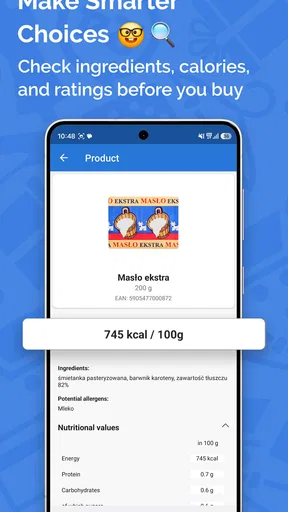
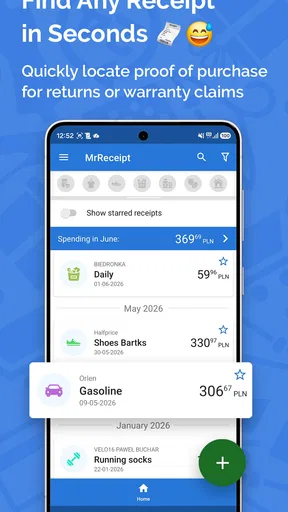
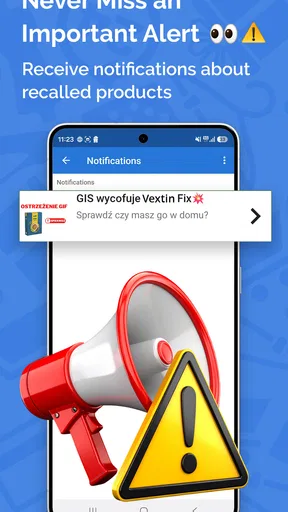
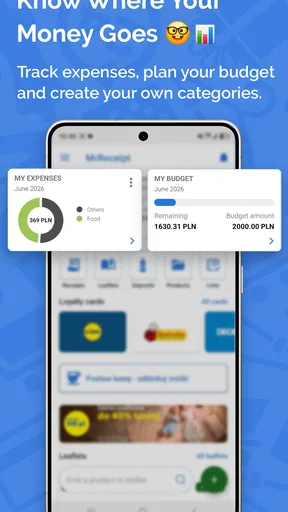
 Analysis by AppCompare
I rarely think about receipts until I need one: a return is due, a work expense needs documenting, or I’m trying to remember what a particular purchase cost. MrReceipt is built for that awkward gap between buying something and needing proof of it later. It gives receipts a home outside my wallet, and its value depends less on clever budgeting than on whether I can keep a simple habit going: capture each bill while it is still easy to find.
A practical routine for receipts
My most useful approach is to treat receipt capture as part of unpacking after a shop, rather than as a separate chore I promise to do later. I add the receipt, check that the important details look right, and put the paper somewhere safe until I know I no longer need it. That small review matters: a photo can be readable while an extracted date, amount, or vendor still needs correction or a manual entry.
This routine is especially helpful for purchases with a likely afterlife: household appliances, clothing that may need returning, or supplies bought for work. Instead of remembering which pocket or drawer holds the paper, I can search the digital record. For a low-value purchase I may not care about again, capturing it is less important. The app works best when I use it selectively and consistently, not when I try to turn every transaction into a detailed bookkeeping project.
What to check before relying on it
MrReceipt is a free shopping app from MrReceipt Sp. z o.o., with optional in-app purchases listed from $0.99 to $5.99 per item. It is rated for Everyone and has an average rating of 4.4 from around 10,000 ratings, with over 500,000 installs. It first appeared on September 22, 2017, and its minimum Android requirement is version 8.0. Those details make it easy to judge whether it fits your device and comfort level, but I would still check the current app-store page before installing because compatibility can vary by device.
Before making the app my only copy of a receipt, I would test the full routine with a nonessential purchase: add a receipt, search for it later, and see whether the saved record is clear enough for the purpose I have in mind. The app describes cloud storage, which can be reassuring when changing or losing a phone, but I would not treat that as a reason to discard an original document that a retailer, employer, or warranty process may require. Keeping the paper until a return or claim is settled is a sensible backup.
It is also worth deciding how much detail I actually want to maintain. Categories can make later browsing more useful, but overly fussy sorting creates work and makes the habit easier to abandon. I would start with a few broad labels that match real spending patterns, then add detail only if I repeatedly need it. For a quick personal archive, vendor and date may be enough; for expense claims, I would check the employer’s documentation rules rather than assume a stored image will satisfy them.
Small habits that make search more useful
Search is most helpful when I use it as retrieval, not as a substitute for a consistent filing routine. If I know I will later look for a shop name, I make sure the captured record has a readable vendor field; if I expect to search by date, I check that the date was recognized correctly. When a receipt is faded, folded, or printed on a narrow strip, laying it flat and taking a clear picture is a practical step before relying on the extracted details.
Worth Reading Before You Choose

Flipboard Shows What News Apps Must Do Beyond the Feed

Switching to Android Auto Means Rethinking Your Driving Routine

Google Calendar Makes a Crowded Week Easier to Manage

Ludo King Makes the Most of the Minutes Between Plans

Baby Panda World Brings Quick Play to Modern Phones, but Its Game Library Feels Busy

ESPN’s Live Game View Makes Following Close Games Easier
For travel, I would add receipts as I go and use a consistent category for the trip rather than waiting until I return with a pile of paper. That reduces the chance of mixing meals, transport, and personal purchases together. It is also a useful way to prepare for reimbursement, but it does not replace checking the organization’s rules about acceptable evidence or submitting expenses by its deadline. A digital archive makes the paperwork easier to find; it cannot decide which costs qualify.
Another useful pattern is a brief weekly check rather than a long end-of-month cleanup. I can review recent entries, fix obvious recognition errors, and notice whether a receipt is missing while the purchase is still fresh in my memory. This is a modest routine, not a reason to inspect every entry repeatedly. If I rarely need expense summaries, a lighter touch makes more sense than spending time categorizing purchases purely for the sake of a perfectly tidy archive.
Where it fits among other options
The familiar alternative is keeping paper receipts in a wallet, envelope, or drawer. That costs nothing and preserves the original, but it becomes awkward when I need one specific slip or want to keep purchases from several months together. A phone’s general photo gallery is another low-effort option, though receipt pictures can disappear among unrelated photos unless I sort them carefully. MrReceipt is more purpose-built for finding and categorizing bills, so it can be a better fit when retrieval is the main problem.
It is not automatically better than a spreadsheet or an expense system. A spreadsheet can be more flexible for someone who wants custom columns, calculations, or a tailored budget; a workplace expense platform may be the right place for formal reporting. MrReceipt makes more sense as a personal receipt organizer than as a promise of full financial management. If I mainly want to track income, plan a budget, split bills, or prepare accounts, I would choose a tool designed around those jobs instead of expecting receipt storage to cover them.
The choice also depends on how much effort I am willing to spend at the moment of purchase. Taking a photo and checking the entry is more work than dropping paper into a box, but less work than hunting through that box later. If I already scan documents using another app and have a reliable naming system, adding a separate receipt app could create duplicate work. I would switch only if the categories and search make finding records noticeably easier in my everyday routine.
Using MrReceipt With Confidence
I approach receipt storage as a small routine rather than a one-time cleanup: I add a bill when I’m putting a purchase away, then check that its key details are useful for finding it later. In this section, I’ll focus on how to keep that routine dependable without turning it into bookkeeping. A consistent, light-touch process is more valuable than elaborate sorting I won’t maintain.
Getting Started with MrReceipt
First things first, downloading MrReceipt is a breeze. Available for both Android and iOS, it’s super easy to find in the app stores. Once you’ve got it on your device, setting up is a straightforward process. The app welcomes you with a clean, intuitive interface that doesn’t overwhelm you with too many options at once. You start by creating a free account, which takes just a few minutes.
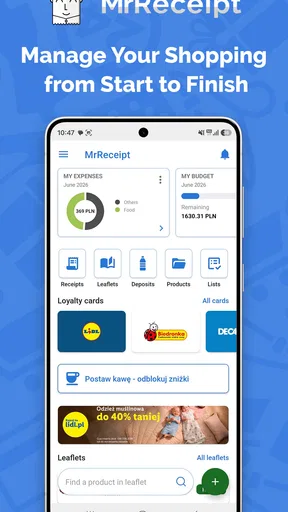
The main dashboard is where all the magic happens. It’s designed to be user-friendly, letting you add receipts with just a few taps. You can snap a photo of your receipt, and the app does the rest by automatically extracting the important details like date, amount, and vendor. You can also manually enter details if you prefer.
Features That Stand Out
One of my favorite features is the categorization ability. You can organize your receipts into various categories like groceries, dining, utilities, and more. This makes it super easy to track where your money goes each month. It’s like having a personal accountant right in your pocket.
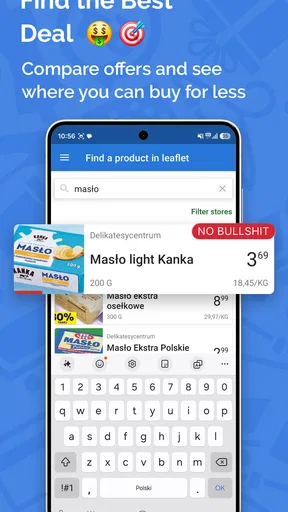
Another cool feature is the search functionality. Imagine scrolling through months of receipts trying to find that one elusive piece of paper. With MrReceipt, you can just type in a keyword or date, and voila! The app quickly pulls up the relevant document.
The app also offers cloud storage, meaning your receipts are safe and can be accessed from any device. This is a lifesaver if you’re someone who tends to misplace things easily. Plus, it gives you the peace of mind that even if you lose your phone, your receipts are safe and sound.
What Makes MrReceipt User-Friendly?
I’ve used other receipt management apps before, and sometimes they can feel clunky or overly complicated. MrReceipt keeps it simple. The design is clean, and navigation is straightforward. Even if you’re not tech-savvy, you’ll find your way around the app without any trouble.
The app supports multiple languages, which is a nice touch, especially if English isn’t your first language. It shows the developers really thought about the needs of a global audience.
Why You Might Love It
If you’re someone who loves staying organized, or if you’re just tired of drowning in a sea of paper receipts, then MrReceipt is definitely worth trying. It’s not just about keeping things tidy; it’s about gaining control over your finances. The app helps you see where your money is going, which can be a real eye-opener.
For those who travel frequently, this app is a game-changer. You can easily keep track of all your travel expenses and have them ready for reimbursement without the hassle of keeping physical copies.
Final Thoughts
In a world where we’re all striving for efficiency and organization, MrReceipt hits the mark. It’s the kind of app that once you start using, you wonder how you ever managed without it. It’s not just about storing receipts; it’s about taking charge of your spending habits and making life a little less stressful.
If you’re ready to declutter your wallet and streamline your finances, give MrReceipt a go. It might just become your new favorite app. Happy organizing!
Pros
- Easy organization of all receipts.
- User-friendly interface for quick access.
- Supports multiple currencies and languages.
- Cloud backup to prevent data loss.
- Customizable categories for receipts.
Cons
- Limited free storage
- requires upgrade.
- No offline mode for receipt uploads.
- Ads in free version can be intrusive.
- Occasional sync issues with cloud.
- No integration with financial apps.
FAQs for MrReceipt - bills in one place
What is MrReceipt and how does it work?
MrReceipt is a digital app designed to help users organize and store all their receipts in one convenient place. By simply taking a photo of your paper receipts, the app digitizes and categorizes them, making it easy to track spending and manage budgets. The app also allows for easy search and retrieval of receipts when needed.
Is MrReceipt secure for storing my financial information?
Yes, MrReceipt prioritizes the security of your financial data. The app employs encryption technology to keep your information safe and private. Additionally, it uses secure servers to store data and offers features like password protection and biometric login to ensure only you have access to your receipts.
Can I use MrReceipt for tax purposes?
Absolutely. MrReceipt is particularly useful during tax season as it allows you to categorize and export receipts based on type, date, or category. This functionality can simplify the process of claiming deductions and ensure you have all necessary documentation readily available for audits or reviews.
Is MrReceipt compatible with both Android and iOS devices?
Yes, MrReceipt is available for both Android and iOS platforms. The app is designed to work seamlessly on a wide range of devices, ensuring that users can access their receipts and manage their finances regardless of their smartphone or tablet preferences.
Does MrReceipt offer any integration with other financial tools?
MrReceipt provides integration with several popular financial management tools, allowing users to sync their data effortlessly. This feature helps streamline financial tracking by connecting your receipt data with budgeting apps and accounting software, enhancing overall financial management efficiency.


